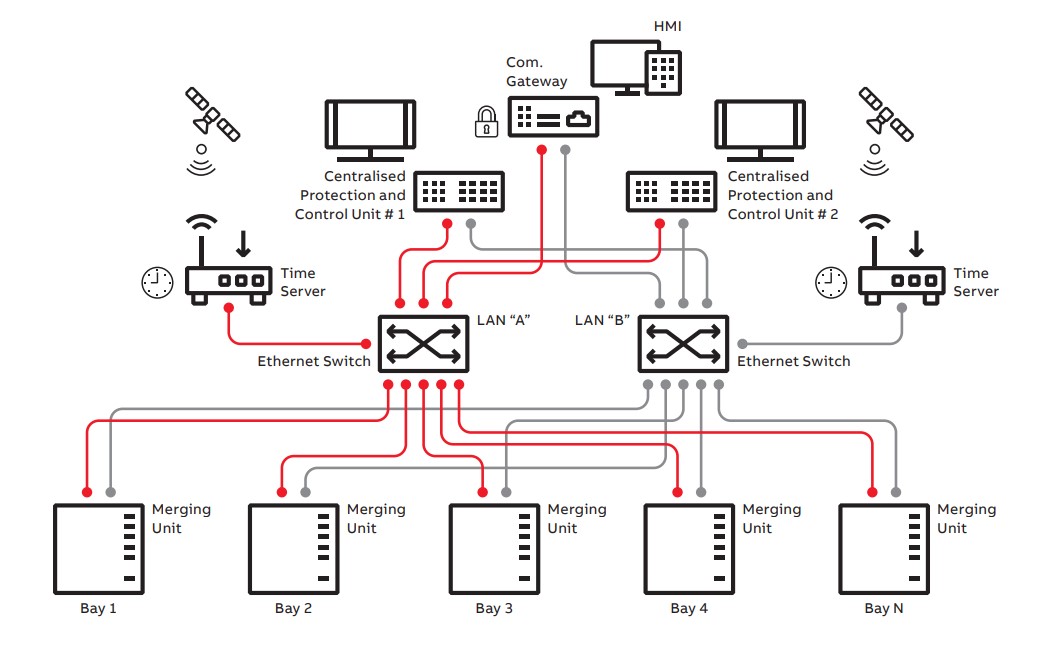
Modern digital substations use Ethernet networks to allow intelligent electronic devices (IEDs) to communicate with each other. Instead of relying on large bundles of dedicated wiring, these devices exchange information over standard network cables. Communication standards such as IEC 61850 make this possible by enabling fast and reliable sharing of data like equipment status, configuration settings, and real-time electrical measurements.
Every device in a digital substation has a network interface, and each interface is assigned a unique identifier known as a Media Access Control (MAC) address. This address is permanently set by the manufacturer and acts like a hardware fingerprint for the device on the local network. In a substation network, a MAC address plays a vital role in making sure messages are delivered to the correct device.
In this article, we’ll take a closer look at what a MAC address is and how they are used within a digital substation to ensure that data packets are delivered to the correct device within the network.
MAC Address Basics
Every device that connects to a network has a communication interface, and each of these interfaces is assigned a unique MAC address. This address is a built-in identifier that allows a network device to identify itself on a local network.
No two devices anywhere in the world are supposed to share the same MAC address. For this reason, the MAC address is often called a hardware address or physical address.
Whenever data is sent over an Ethernet network, the message (called a packet or frame) includes two MAC addresses:
- Source MAC address: identifies the device sending the data
- Destination MAC address: identifies the device meant to receive it
Ethernet switches rely on these MAC addresses to decide where to forward data, ensuring that information reaches the correct device.
How to Read a MAC Address
A MAC address is 48 bits long and is typically written in hexadecimal format. It is displayed as six groups of two characters, separated by colons (:) or hyphens (-). For example:
00:1A:2B:3C:4D:5E
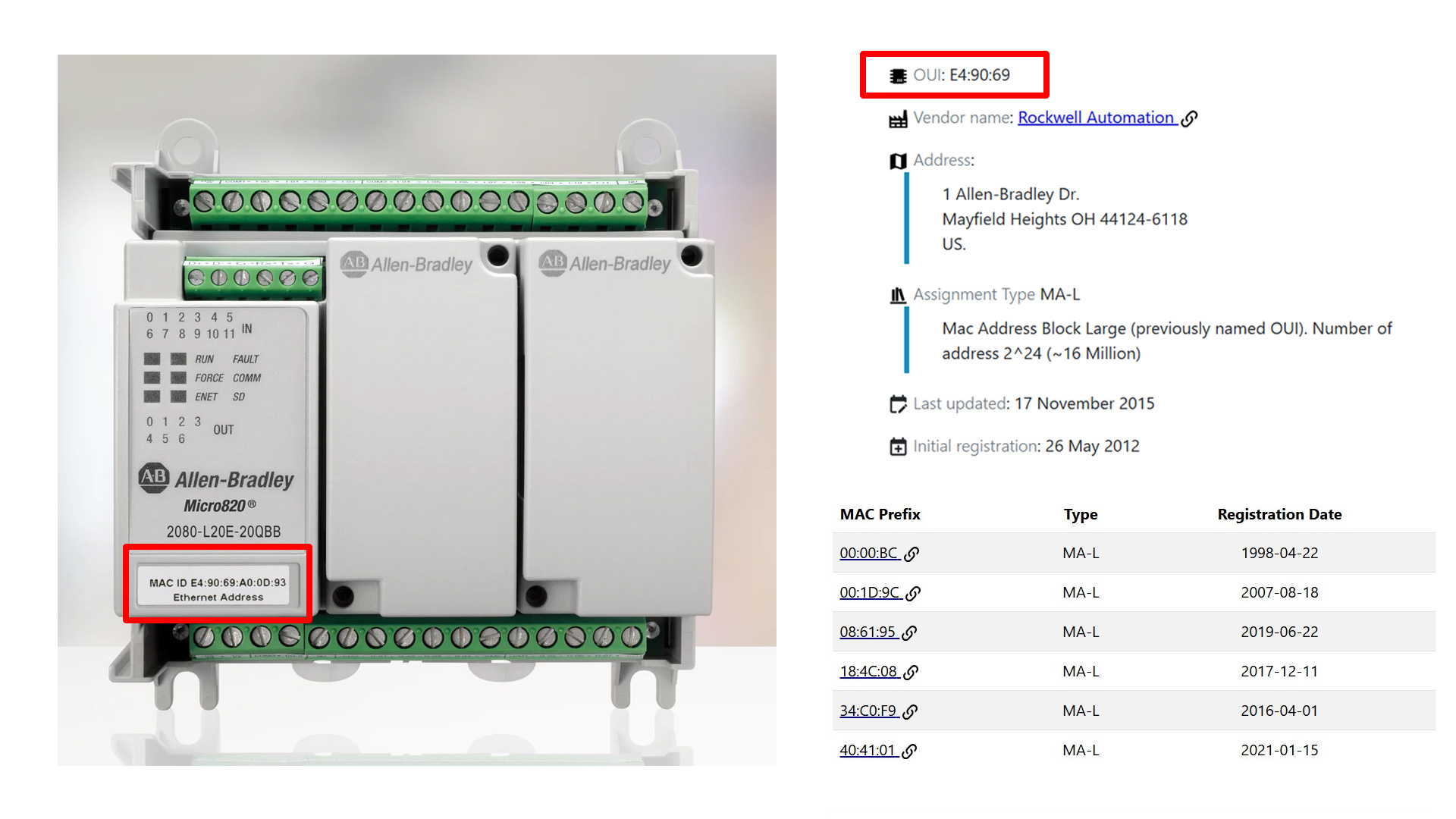
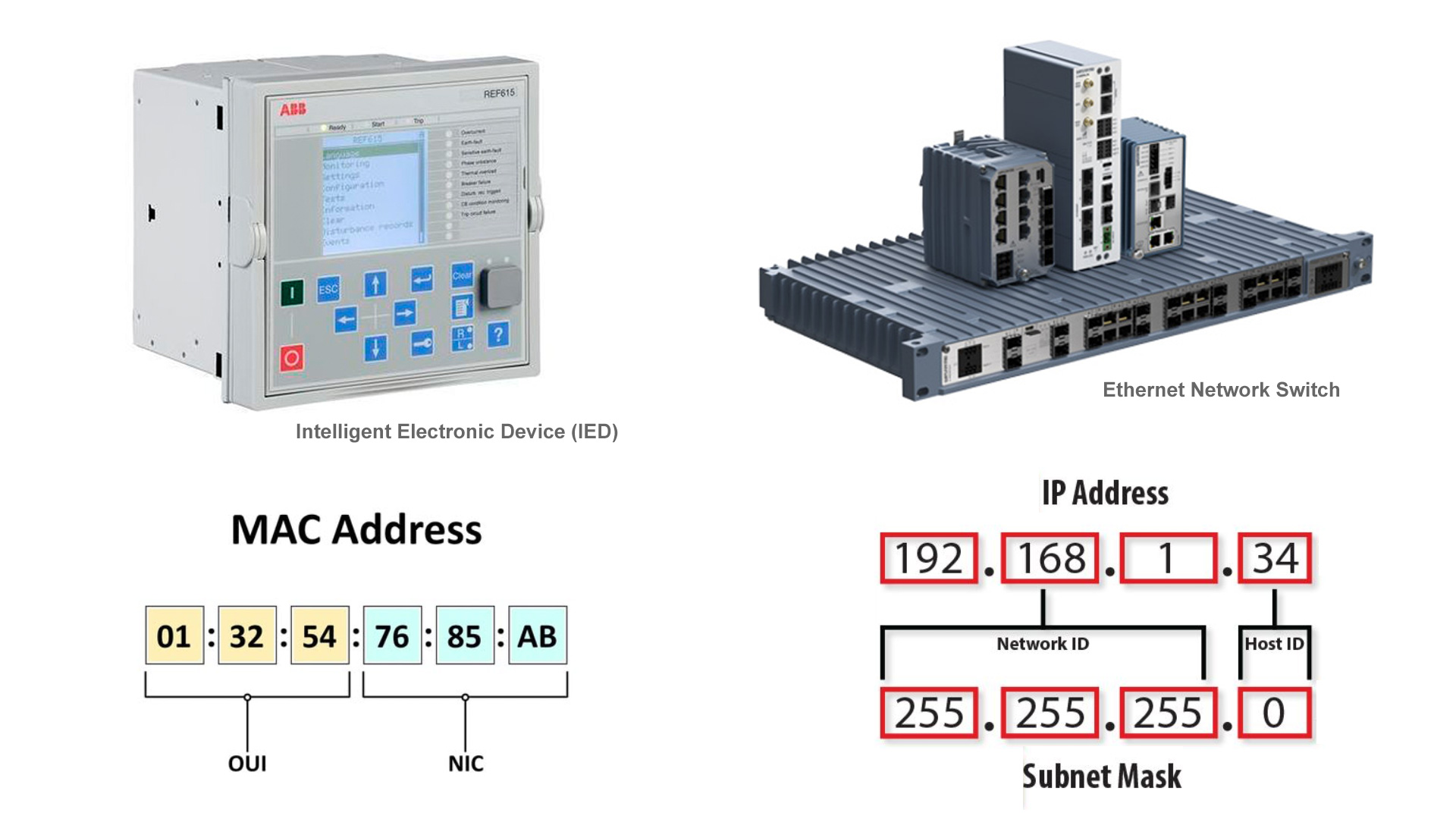
The first three groups (the first 24 bits) are assigned to a manufacturer and are known as the Organizationally Unique Identifier (OUI). This portion of the MAC address identifies the company that produced the network interface. In this example: 00:1A:2B
The remaining three groups are assigned by the manufacturer. These values are unique for each network interface they produce and are commonly referred to as NIC-specific (Network Interface Card specific). Together with the OUI, they ensure that every network interface has a globally unique MAC address. In this example: 3C:4D:5E
How to Identify Manufacturers by MAC Address
In a digital substation, a device’s MAC address can often be found on a physical label attached to the IED or near its network interface. This is especially helpful during installation, troubleshooting, or network configuration.
The IEEE (Institute of Electrical and Electronics Engineers) manages the assignment of OUI ranges to manufacturers. By checking the first part of a MAC address against the IEEE database, you can determine which company manufactured the network interface.
MAC Address vs. IP Address
The main purpose of a MAC address is to allow devices on a network to identify and communicate with each other. At the most basic level, all Ethernet communication relies on MAC addresses. When one device sends data to another, the information is ultimately delivered using the destination device’s MAC address.
This is true whether the devices are on the same local network, such as within a substation, or communicating across multiple networks over long distances. Even when data travels across routers and the internet, MAC addresses are used on each local network segment to move the data from one device to the next.
MAC addresses should not be confused with Internet Protocol (IP) addresses. An IP address is also a unique identifier, but unlike a MAC address, it can change over time.
IP addresses are often assigned by a network administrator or service provider and may change due to network reconfiguration, device movement, or system restarts. In contrast, MAC addresses are permanently assigned to the network hardware and typically do not change.
MAC and IP addresses work together. A simple way to think about it is:
- MAC address: identifies who the device is
- IP address: identifies where the device is located on the network
Together, they allow data to be sent to the right device at the right location.
Network Delivery Methods
When data is sent over an Ethernet network, the destination MAC address determines who should receive the message. There are three main types of destination MAC addresses used on a local network: unicast, multicast, and broadcast.
Unicast
A unicast MAC address identifies one specific network device. This creates a one-to-one communication path, where data is sent from a single sender to a single receiver. In normal device-to-device communication, the destination MAC address in the Ethernet frame is simply the MAC address of the intended recipient.
Multicast
A multicast MAC address is used for one-to-many communication. Instead of sending the same data multiple times to individual devices, a sender can transmit a single data stream to a defined group of devices that have joined that multicast group. This approach is more efficient and is widely used in digital substations.
In Ethernet networks, multicast MAC addresses follow specific patterns. For IPv4-based multicast, these addresses typically begin with the prefix 01:00:5E. Network switches recognize multicast addresses and forward the data only to the switch ports connected to devices that have subscribed to that multicast group, rather than sending the data to every device on the network.
Broadcast
A broadcast MAC address is used for one-to-all communication. The broadcast address is always FF:FF:FF:FF:FF:FF, where all bits are set to 1. Frames sent to this address are delivered to every device on the local network segment.
This is commonly used for tasks such as discovering devices or requesting an IP address. Ethernet switches forward broadcast frames out all ports (except the one they were received on), while routers block them from crossing into other networks.
MAC Addresses in IEC 61850 Standard Protocols
In digital substations, IEC 61850 defines how critical data is exchanged between devices using Ethernet. To support fast and efficient communication, several IEC 61850 protocols use predefined multicast MAC address ranges rather than normal unicast addresses.
IEC 61850 reserves a special multicast MAC address prefix, 01:0C:CD, for substation automation traffic. Different services within IEC 61850 use specific ranges within this prefix, allowing network devices to easily recognize and handle the traffic appropriately. The fourth byte of the MAC address is used to identify the type of service.
Two of the most common IEC 61850 services that rely on these multicast MAC addresses are GOOSE and Sampled Values (SV):
| Service | MAC Range | Purpose |
| GOOSE (Generic Object Oriented Substation Events) | 01:0C:CD:01:00:00 to 01:0C:CD:01:FF:FF | fast protection and control signals, such as trips and interlocks |
| Sampled Values (SV) | 01:0C:CD:04:00:00 to 01:0C:CD:04:FF:FF | time-critical measurement data, such as sampled current and voltage values |
Because these addresses are multicast, a single message can be sent once and received by multiple IEDs at the same time. This reduces network traffic and ensures that all subscribing devices receive the data with minimal delay. Devices that publish GOOSE or SV messages transmit them to the configured multicast MAC address, while subscribing devices listen for messages addressed to that same MAC.
The specific multicast MAC addresses used by each device are defined during system engineering and are stored in Substation Configuration Language (SCL) files. Unlike standard unicast MAC addresses, these multicast addresses are selected from the reserved IEC 61850 ranges.
Example MAC Address Formats
- GOOSE: 01:0C:CD:01:XX:XX
- Sampled Values: 01:0C:CD:04:XX:XX
In these examples, XX:XX represents values chosen to make each multicast address unique within the system.
MAC Flooding Attacks
MAC flooding happens when an attacker targets network switches by overwhelming them with a large number of fake MAC addresses. This fills the switch address table, which prevents the switch from managing traffic efficiently.
When the switch MAC address table is full it may enter a fail-open mode and behave like a hub, broadcasting all traffic to every port. This allows attackers to intercept sensitive data using packet sniffing tools and often serves as a stepping stone for more advanced attacks.
MAC flooding can have serious consequences in digital substations because these environments depend on highly reliable, low-latency communication between protection and control devices. GOOSE messages and Sampled Values must be delivered quickly and with certainty to ensure proper operation of protection relays and control systems.
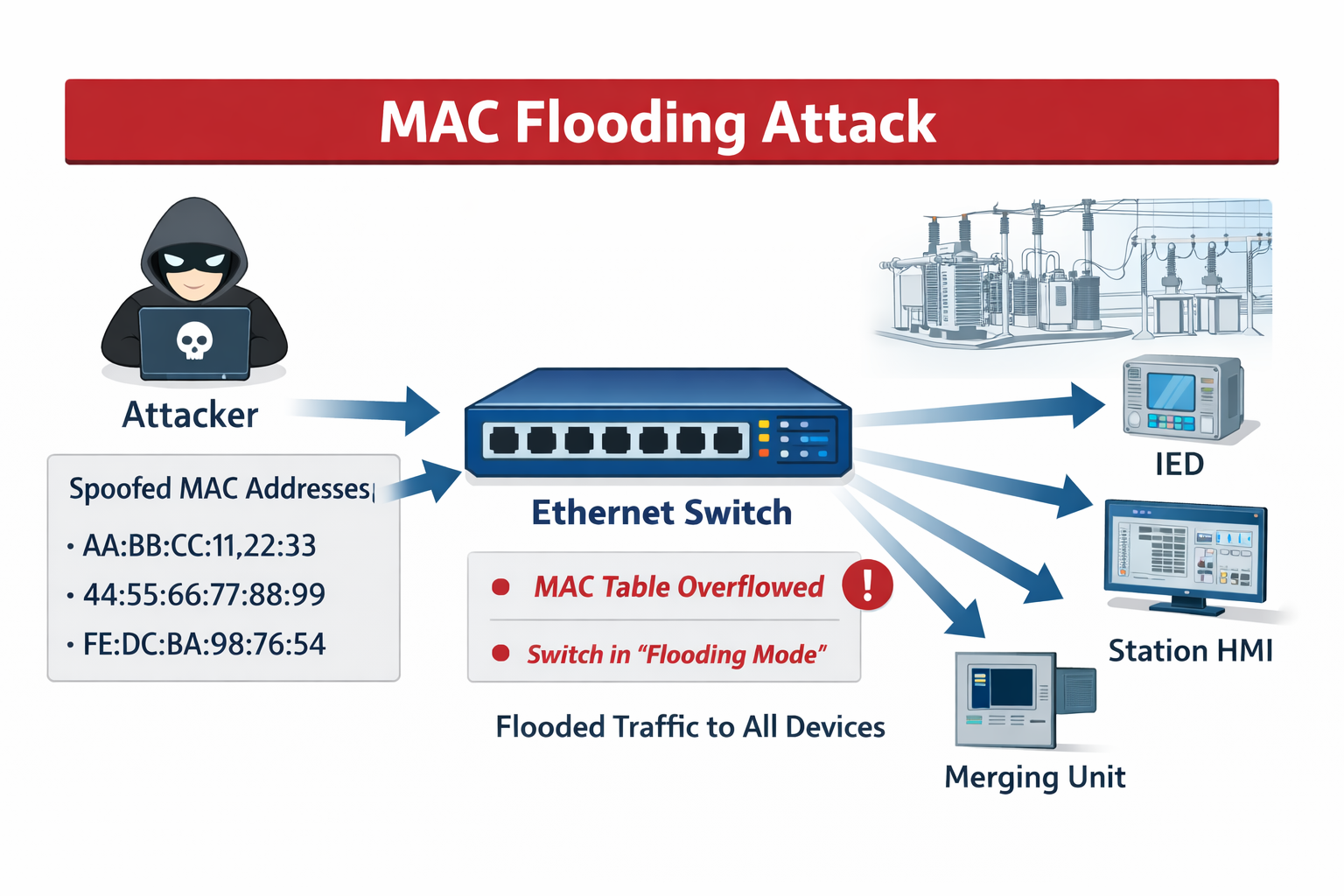
Even small delays can lead to protection relays failing to trip when needed or nuisance tripping, potentially causing equipment damage or outages. The broadcast behavior also allows an attacker to capture or manipulate critical data, opening the door to further attacks.
Once visibility into traffic is gained, attackers can map the network, identify critical devices, and launch more targeted attacks against intelligent electronic devices (IEDs). To mitigate these risks, substations typically implement strict network segmentation, port security, VLANs, and IEC 61850 security controls to ensure that only legitimate traffic is allowed and prioritized.
Summary
MAC addresses form the foundation of communication in digital substations. Every network-enabled device has a unique, hardware-based MAC address that allows Ethernet networks to deliver data to the correct destination.
Understanding the difference between MAC addresses and IP addresses is essential when working with substation networks. While IP addresses describe where a device is located and can change over time, MAC addresses identify the device itself and remain fixed. Together, they allow network traffic to be routed correctly across local and wider networks.
Different communication patterns define how data is shared between devices. Unicast supports one-to-one communication, broadcast reaches all devices on a local network, and multicast enables efficient one-to-many data exchange.
Multicast allows critical messages in a substation to be delivered to multiple IEDs simultaneously without unnecessary network load. IEC 61850 builds on these concepts by reserving specific multicast MAC address ranges for protocols such as GOOSE and Sampled Values, ensuring fast and reliable communication.
MAC flooding attacks can disrupt critical, time-sensitive communications between protection and control systems, leading to delays, data exposure, and potentially serious consequences like equipment damage or power outages. To reduce risk, digital substations use network segmentation, port security, VLANs, and IEC 61850 security controls to allow and prioritize only legitimate traffic.
References
- What is a MAC address? How to find it and hide it
- MAC Address in Digital Substations
- MAC Address Lookup
- IEC 61850 GOOSE Messaging vs. Sampled Values
- MAC Flooding Attack Explained
 With over 20 years of experience in power systems testing and maintenance, I am a seasoned professional dedicated to enhancing operational efficiency. I excel in improving processes, systems, tools, research, training, and technology implementation. Contact me to see how we can keep your systems running at peak performance.
You may also like...
- Strategies for Reducing Load Interruptions During Electrical Maintenance
- Strategies to Reduce Power Disruptions from Data Center Loads
- SF6 Gas Alternatives for a Sustainable Energy Future
- Layer by Layer: Breaking Down Virtual Protection Relay Architecture
- Improving Cybersecurity in the Electrical Power Distribution Industry with Blockchain